
- 0
- 976 words
You can protect your basement from recurring water problems by installing a properly chosen and placed sump pump. A correctly installed sump pump removes excess groundwater, preventing floods and costly water damage when you need it most.
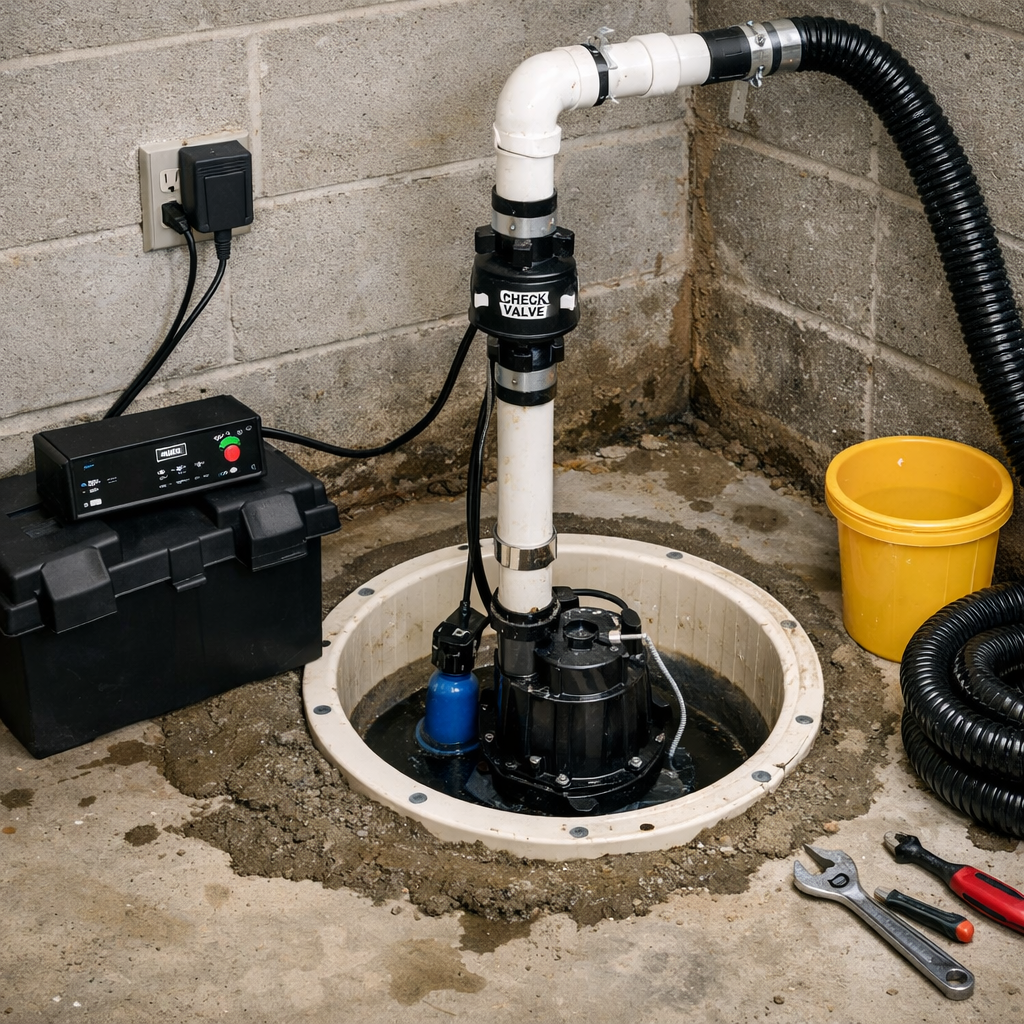
This post Sump Pump Installation walks you through selecting the right pump, the step-by-step installation process, and the simple maintenance and troubleshooting tasks that keep the system reliable. Expect practical, actionable guidance so you can tackle the job confidently or know what to ask a pro.
Sump Pump Installation Process
You will select an appropriate pump, prepare the pit and discharge path, and follow a clear sequence of drilling, pipe fitting, and electrical hookup. Safety, correct sizing, and a reliable discharge route determine long-term performance.
Choosing the Right Sump Pump
Choose between a submersible pump and a pedestal pump based on space, noise, and debris handling. Submersible pumps sit in the pit, handle grit better, and are quieter; pedestal pumps keep the motor above water for easier service but occupy more vertical space.
Match pump capacity to your basement’s worst-case inflow. Calculate required flow in gallons per minute (GPM) using local rainfall intensity and area drained, then select a pump with slightly higher GPM and head rating. Check the pump’s head curve to ensure it can lift water to your planned discharge height.
Decide on power and backup options. Use a dedicated 120V GFCI outlet and consider a battery backup or water-powered backup if you need protection during power outages. Verify float-switch type (vertical or tethered) for reliable activation in your pit dimensions.
Site Preparation and Safety Precautions
Locate the sump at the basement’s lowest point or where perimeter drains converge. Avoid areas under heavy shelving or electrical panels and keep at least 12–18 inches clearance around the pit for access and service.
Gather tools and materials: shovel, wet/dry vacuum, 4–6” diameter liner or pre-cast basin, gravel, PVC discharge piping, check valve, hose clamp, pipe straps, drill, and GFCI outlet or pump plug. Read pump manual for manufacturer-specific requirements beforehand.
Follow electrical and plumbing safety rules. Turn off power when wiring, use a GFCI-protected circuit, and cap or secure the discharge to prevent backflow. Wear eye protection and gloves; if you dig below slab or near utilities, call 811 to locate lines first.
Step-by-Step Installation Guide
Mark and cut a hole for the basin or dig a pit roughly 2 feet deep and sized for the liner’s outer diameter. Place 2–3 inches of compacted gravel in the bottom for leveling and to promote drainage under the pump.
Set the basin or liner in place, level it, then backfill around it with gravel so the top flange sits flush with the finished floor. Install the pump on the basin floor, ensuring the float switch has full travel without obstruction.
Attach the discharge pipe to the pump outlet with a threaded adapter or hose clamp, then route PVC up and out through the wall or joist space with a continuous slope away from the house. Install a check valve vertically above the pump outlet; put the ball or flap in the correct orientation to prevent backflow.
Connect the pump to a GFCI-protected outlet or hardwire per local code. Test operation by pouring water into the pit until the float activates; inspect joints for leaks and confirm the check valve closes. Secure piping with straps and direct discharge at least 10 feet from the foundation or to an approved storm drain.
Post-Installation Maintenance and Troubleshooting
Keep the pump powered, the discharge clear, and the float free to move. Test the system under load, inspect components regularly, and address small problems—clogged intake, stuck float, or backup power failure—before they cause flooding.
Testing and Initial Setup
Right after installation, plug the pump into a dedicated outlet and confirm the circuit can handle the amperage marked on the pump label. Use a grounded GFCI if local code or your electrician recommends it.
Fill the sump pit with water until the float activates. Watch the pump run through a complete cycle and verify the discharge pipe moves water freely to the outside and the check valve closes to prevent backflow. Measure run time; short rapid cycling or continuous running indicates sizing, float, or discharge issues.
Record voltage at the outlet with a multimeter and test any battery backup by simulating a power failure. Label the breaker and leave clear access to the pit for future tests.
Routine Maintenance Tips
Inspect the pit and pump every 3 months and after heavy storms. Remove debris, gravel, and slime that can block the inlet screen or clog the impeller.
Check the discharge line and external termination point for ice, debris, or animal nests twice a year. Confirm the check valve seals and tighten any loose pipe fittings. Replace corroded clamps and pipe sections promptly.
Test the float switch by pouring water into the pit and listen for smooth activation. For battery backups, test monthly, check electrolyte (if applicable), and replace batteries per manufacturer schedule or when capacity falls below recommended levels.
Identifying and Fixing Common Issues
If the pump won’t start, first verify power: check the outlet, breaker, and any GFCI. If power is present but the motor hums, a seized impeller or failed start capacitor is likely; remove the pump for inspection or call a technician.
Trouble with short cycling often stems from a float switch that’s snagging or a too-small pit. Ensure the float moves freely and consider installing a vertical float or tether adjustment. Persistent cycling may require a larger-capacity pump.
Reduced flow usually means a clogged intake, damaged impeller, or kinked discharge pipe. Clear the inlet, inspect the impeller for wear, and straighten or replace the discharge line. For backups that don’t run on battery power, test the charger and battery connections and replace the battery if voltage or runtime is inadequate.
Author

admin@cloudgenicsync.com